How COD is built: one path for the browser, separate services behind it
At some point in every project comes the talk with the security department. What parts does the software consist of? Who talks to whom? What is exposed on the network? And where is the data? This page answers that as of COD 3.8, without port numbers and addresses.
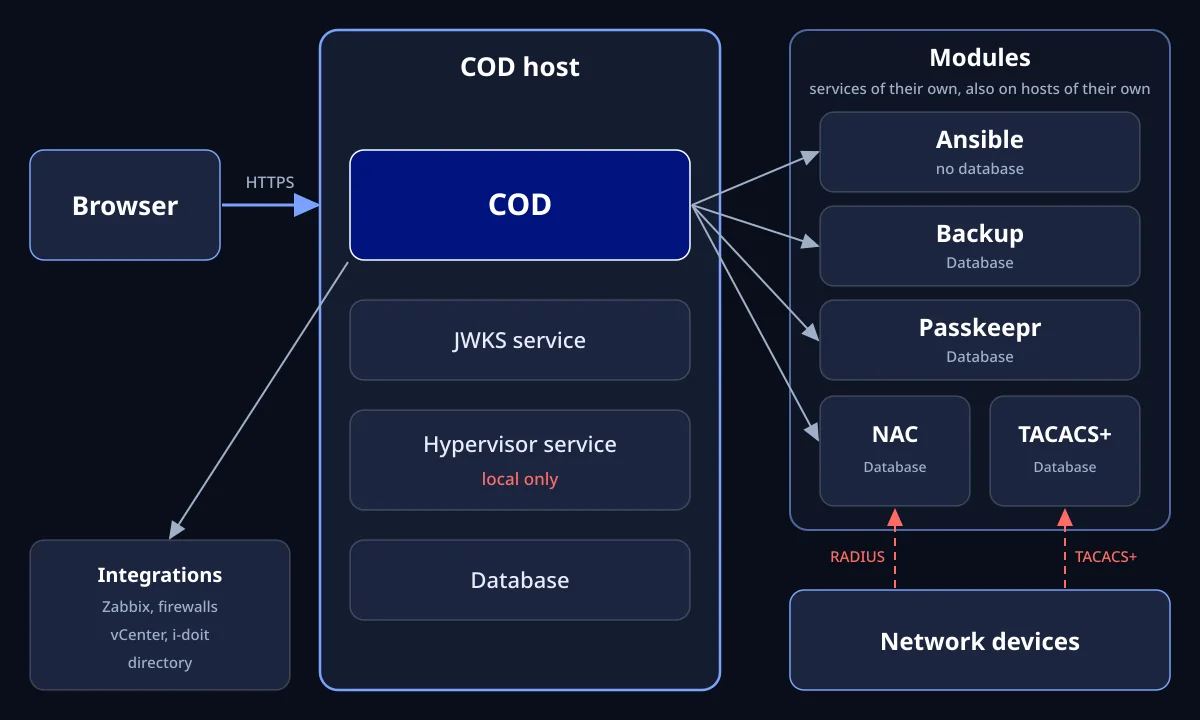
Our own diagram for an installation on one server, as of COD 3.8. Without ports and addresses.
The interface never talks directly to a module
The browser reaches the COD host through HTTPS. A reverse proxy can sit in front of it. Every call to a module goes through COD, and COD checks the rights. That is why the same check applies in Network, in GRC and in the global search.
Besides the browser there is a second path to the installation, and we name it: your network devices speak RADIUS to the NAC service and TACACS+ to the TACACS+ service. This has to be so, because that is where the access decision is made.
What COD consists of
Modules as services of their own
NAC, Backup, Passkeepr, TACACS+ and Ansible run as services of their own next to COD. NAC, Backup, Passkeepr and TACACS+ each have their own database. Ansible has none.
One place for the keys
Anyone who logs in receives a signed token. The JWKS service provides the public keys, and each module checks the token with them itself. The service normally runs on the COD host and can have a host of its own.
Hypervisor service: always on the COD host
The hypervisor service always runs on the COD host, because COD reaches it only through the local loopback.
Ansible service: on the COD host or on its own host
By default the Ansible service listens only on the local loopback. If it runs on a host of its own, you set the network address there, and the COD host reaches it over the network. You regulate this path in your firewall.
Deployment shapes with Self Hosted
The shapes can be combined. With Shared Hosted and Private Hosted, extocode operates the instance. With Private Hosted, you provide and operate the NAC component in your own network.
Everything on one server
COD, JWKS service, all modules and the databases on one host. For getting started or where nothing has to be separated.
COD server and module servers
NAC, Backup, Passkeepr, Ansible or TACACS+ on hosts of their own. For example RADIUS close to the network devices or a module in a DMZ. Passkeepr should stay next to COD where possible.
Your own database servers
MariaDB and PostgreSQL on your database servers, if a team or your backup takes care of them there.
Several locations
One COD. A further location gets its own Backup, Passkeepr or Ansible instance.
NAC: the decision is made at the switch, not in the dashboard
You maintain the rules in COD, and the NAC service stores them for FreeRADIUS. When a device logs in, the switch asks the RADIUS server, not the dashboard. COD also brings its own certificate authority, so network access can be bound to a device certificate.
Backup: back up and compare, and say openly where the limit is
The Backup service fetches the configuration of network devices, servers and databases on a schedule. Each run is stored with a timestamp. You see the series of states, download files and compare two states. The service restores nothing. You do the restore yourself, in a targeted way.
Why no port numbers are shown here
A public drawing with default ports mainly helps those who scan. Anyone who needs the numbers for a firewall rule finds them in the installation guide for their own environment. For your security review we are glad to answer what is deliberately missing here.
Frequently asked questions
Clarify technical questions
We go through the architecture with your security department and answer what deliberately stays open on this page.