Do you really know what is on your network right now?
Your Excel device list is outdated the day it is created: new devices are missing, retired ones are still listed, OT components often never make it in at all. COD detects every IP-addressable device automatically and maintains a living inventory with live status, topology and multi-vendor control. On-premises, multi-tenant.
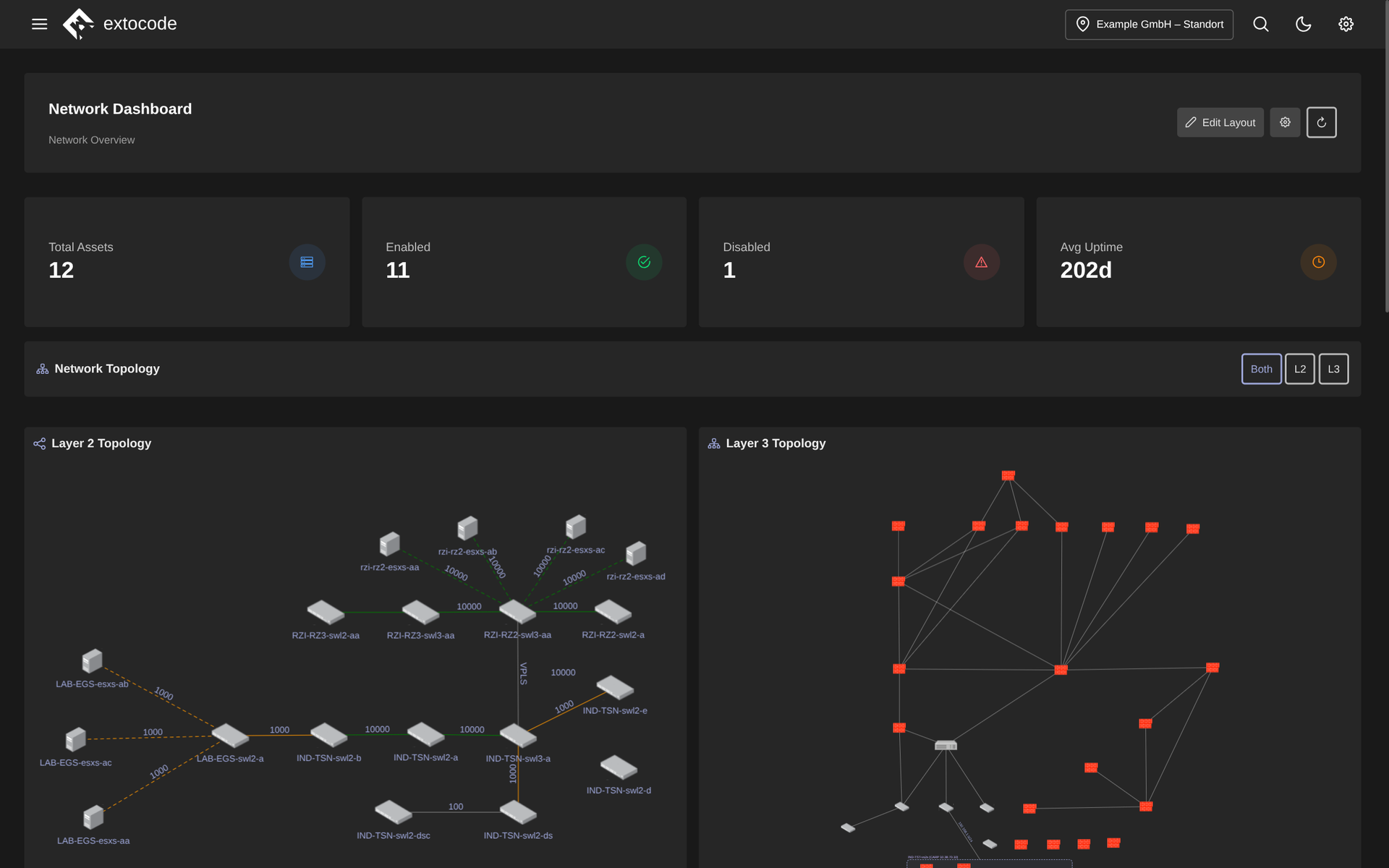
Network dashboard in COD: asset figures (discovered, active, disabled, uptime) at a glance. Below it, the automatically built Layer 2 and Layer 3 topology shows switches, servers and firewalls with hostnames and link speeds, switchable between L2, L3 and combined view.
Know the feeling?
The Excel device list is outdated the day it is created
The pain: Your asset inventory lives in Excel or a manually maintained CMDB. With every new switch, replaced printer and OT device someone would have to update the list. In practice that does not happen. Nobody can say reliably what is actually on the network.
The consequence: Blind spots mean unmonitored, potentially unpatched devices, and an incomplete inventory is a classic finding in a NIS2 or ISO 27001 audit.
How COD solves it: The network module detects every IP-addressable device automatically, from office IT through network hardware into OT. Every device lands in the inventory with live status instead of in yesterday's lists. Devices not covered by monitoring are marked red. Monitoring gaps become visible immediately instead of only in the audit.
A user reports a fault, and first comes the hunt for the device
The pain: "My device isn't working." Before your team can start on the fix, the detective work begins: where is the device, on which switch, on which port? The patch documentation is outdated or exists only in a colleague's head. So it's SSH from switch to switch, searching MAC tables.
The consequence: The actual troubleshooting is delayed by the entire search time, and routine searches tie up exactly the experienced admins who are needed elsewhere.
How COD solves it: With the global search (Ctrl+K) support finds instantly where the device is located and which switch port it hangs on, across network and firewall in parallel. The Layer 2/Layer 3 topology shows the physical connections including speed and LACP status. The port view delivers all port data with live throughput at a click.
A separate tool for every switch vendor
The pain: Networks that have grown over the years contain switches from several vendors, each with its own web interface, its own CLI and its own credentials. Anyone who wants to know whether a port is active or delivering PoE first has to log in and master that vendor's way of doing things.
The consequence: Routine tasks like checking a port or running a cable test take unnecessarily long and stay stuck with a few specialists. Stand-in situations become a source of errors, and bottlenecks only show up once things jam.
How COD solves it: COD shows a model-accurate port view that automatically adapts to the switch or stack: ports colored by speed and activity, unused ones black, PoE with a lightning icon. You manage switches from several vendors (Cisco, Ruijie, Allied Telesis, MikroTik) directly from COD in one interface instead of four vendor tools. Port switching and cable test are available for Cisco, Ruijie and Allied Telesis.
Why COD, not just a feature
The network module is the living asset base that GRC, monitoring and backup build on: one data set instead of a zoo of tools nobody keeps current. Automatic discovery keeps the inventory alive instead of letting it decay, and role-based permissions control who may do what. With the asset workspace every device gets its own detail page: from contracts and contacts through its placement in the rack to the Layer 1 cabling. All of it on-premises and multi-tenant.
Frequently asked questions
See your network live
Request a live demo and see the network module with your own inventory in your environment, or download the datasheet with all features compactly on one page.