Every unused network jack in your building is an open door into your production LAN
One cable into the meeting-room jack, and the unknown laptop is on your internal network. COD controls access via 802.1x and MAC authentication, lets guests onto the network only within a defined time window and brings the matching PKI along. Multi-tenant, on-premises, multi-vendor without vendor lock-in.
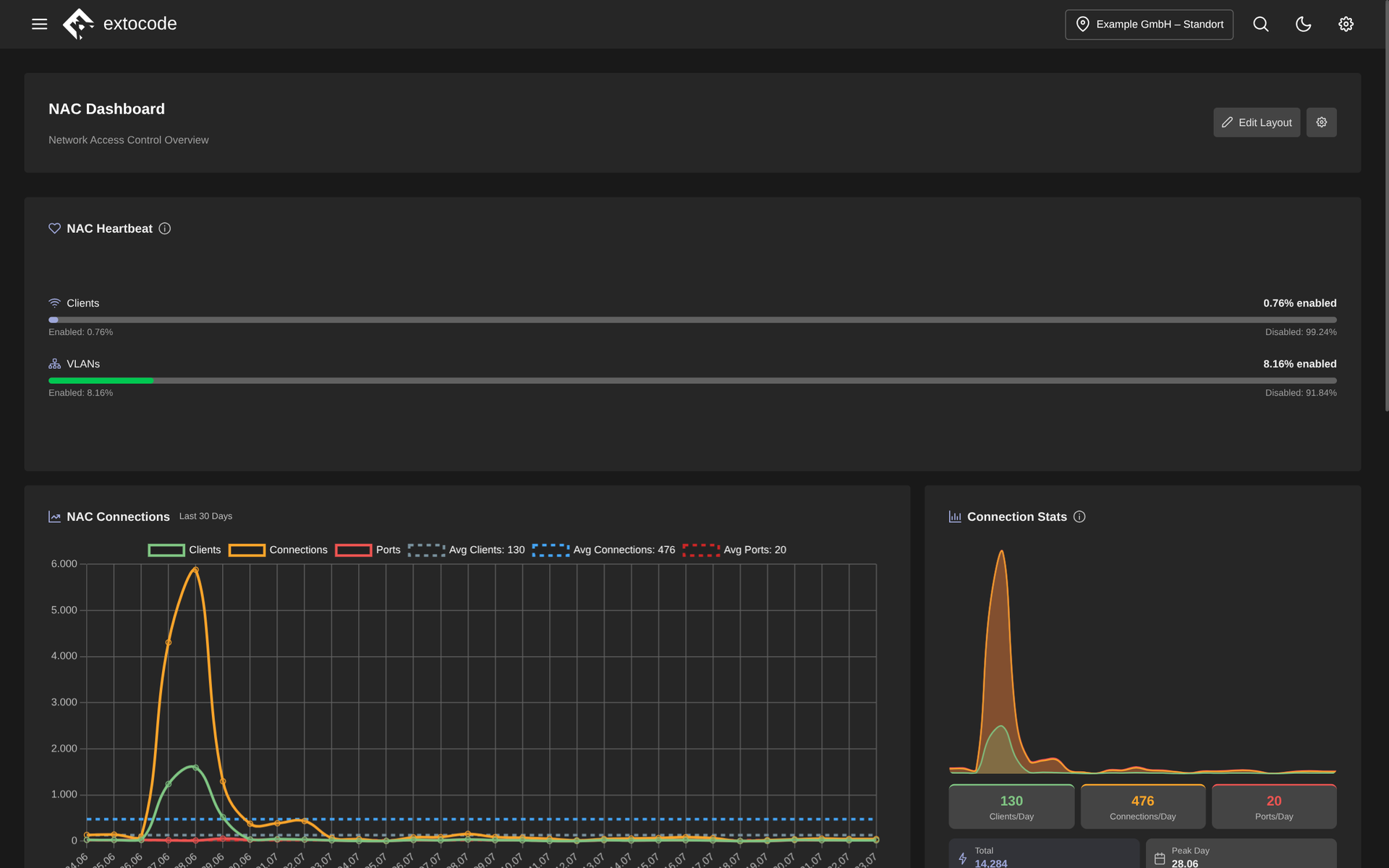
NAC dashboard in COD: heartbeat status for clients and VLANs, the history of clients, connections and ports over the last 30 days, plus connection statistics with daily figures and peak day.
Know the feeling?
Open jacks and forgotten port activations
The pain: In many networks one cable into the jack is enough and the unknown device is on the LAN. For guests and contractors a port gets activated ad hoc, and afterwards nobody thinks of revoking it.
The consequence: Unauthorized devices on the internal network, activations that stay open for good, and in a NIS2 or ISO 27001 audit an obvious finding on missing access control.
How COD solves it: The NAC module implements 802.1x and MAC authentication with VLAN-based access control: devices are assigned to VLAN groups, and ports switch to the right VLAN automatically, driven by events. Time-based access lets guests and temporary staff onto the network only within the defined window. The access expires on its own instead of being forgotten. Multi-vendor, without lock-in.
Certificates for 802.1x: OpenSSL by hand and expiry dates in Excel
The pain: Certificate-based network authentication rarely fails because of RADIUS, but because of the PKI around it: CA and client certificates generated with OpenSSL, expiry dates tracked in Excel, revocation lists maintained by hand, if at all.
The consequence: A server certificate that expires unnoticed brings authentication down across the whole network, and unrevoked certificates of lost devices keep their access. In an audit, that is missing certificate lifecycle management.
How COD solves it: COD ships with a full-fledged Certificate Authority of its own: create and verify CAs (RSA, ECDSA, EdDSA), issue leaf certificates with SANs, generate CRLs, export as PKCS#12, import existing inventories via CSV. Server certificates are rolled out to FreeRADIUS automatically and new CAs are detected on their own. No external PKI tool needed.
Running RADIUS over SSH, and only one person dares to touch it
The pain: FreeRADIUS runs, but maintenance happens on the command line: edit the config, restart the service over SSH, follow the logs with tail. Every new switch as a NAS device means manual work plus a manual restart, and the knowledge hangs on one person.
The consequence: Manual work on the central access service is an error source with leverage. One typo, and network logins fail across the board. When someone has to stand in, the server becomes a black box.
How COD solves it: COD brings FreeRADIUS control into the browser: start, stop and restart in the UI, with live status, uptime and optional log streaming. New NAS devices trigger the service restart automatically, with no SSH at all. The access control is built to be highly available.
Why COD, not just a feature
In COD, NAC is not an isolated RADIUS add-on. It works on the same living asset base as your operations, including its own PKI, instead of having to bolt on an external CA. Multi-vendor without vendor lock-in, multi-tenant and fully on-premises: credentials and certificates stay in your hands, not in a cloud black box.
Frequently asked questions
See NAC live
Request a live demo and see the NAC and PKI module in your own environment, or download the datasheet with all features compactly on one page.