Passkeepr: the team vault in COD
Admin passwords, API keys and maintenance credentials often sit in notes, spreadsheets and chats. Passkeepr keeps them in vaults that your browser encrypts. The server stores only ciphertext. Passkeepr is part of COD from version 3.8. Until COD 3.7 the vault was called Stronghold.
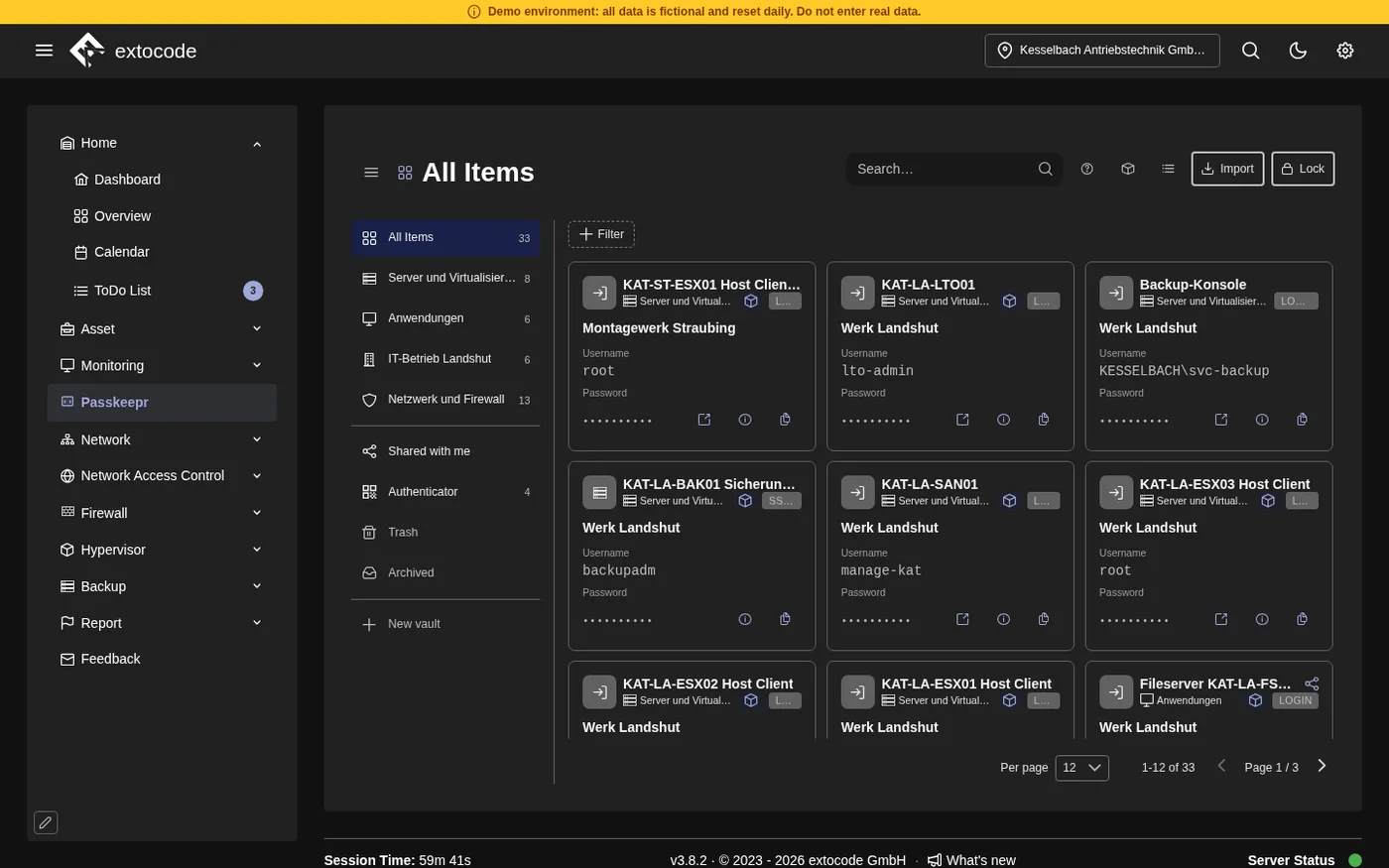
The picture shows the demo's vault with sample data, COD 3.8. The interface is in English.
Know the feeling?
Credentials scattered everywhere, and a vault that sees the secrets itself
The problem: In many teams, admin passwords, API keys and maintenance credentials sit in notes, spreadsheets and chats. Where a central service exists, the question remains: can the server read the secrets in plain text?
The consequence: Scattered credentials are a permanent gap in security and findability. A vault whose server knows everything in plain text concentrates the risk in one place.
How Passkeepr helps: Passkeepr encrypts in the browser. The server stores ciphertext and sealed keys that it cannot open. COD only signs you in and checks your permission. The server knows accounts, memberships and roles. It does not know vault names, item titles, addresses, customers, passwords or notes.
Signing in by copy and paste
The problem: Without a link to the browser, every sign-in goes through the clipboard: open the vault, find the item, copy, paste. That is cumbersome, and on a phishing page the wrong address easily goes unnoticed.
The consequence: The friction tempts people to write passwords down insecurely after all.
How Passkeepr helps: The browser extension for Chrome (version 137 or later) and Firefox (version 140 or later) fills credentials only on the item's own site. A counter on its icon shows how many items match the open page. After you sign in somewhere, it asks whether to save the credentials. One-time codes and passkeys belong to the item.
Access that hangs on one person
The problem: Shared access such as firewall administration, the hosting portal or the domain registrar tends to sit with one person or travel on by chat. If that person is on vacation, ill or has left, access is missing exactly when it is needed.
The consequence: Access that cannot be traced is a risk for operations and for the audit.
How Passkeepr helps: There are personal, shared and enterprise vaults. In a shared vault several people work with “Can edit” or “Read-only”. An enterprise vault belongs to your organisation and stays when people leave. Two or more Keepr admins run it. Instead of deleting, you archive with a reason.
What Passkeepr brings
Three kinds of vaults
Personal vaults are yours alone. Shared vaults you share with colleagues. Enterprise vaults belong to the organisation.
Emergency Kit
When you set up, you choose a master password. Passkeepr then shows your Emergency Kit with a recovery phrase of 24 words and the Secret Key. The phrase sets a new master password if you forget yours. The Secret Key unlocks Passkeepr on a new device. Keep the kit where nobody else can read it, never in COD and not in a backup of it.
Sharing
You share whole vaults or single items, with people or with local groups of your location. Invite links are valid for seven days and can be used once.
One-time codes and passkeys
One item carries password, one-time code and passkey together. The extension supplies the code when you sign in. The extension stores passkeys and asks about them in a window of its own. Since COD 3.8.2, version 3.3.2 is required. It ships with COD and is installed from Passkeepr.
Import
Import reads files from Bitwarden, 1Password, KeePass, sysPass, CSV and JSON, including password-protected ones. With Bitwarden, the passkeys come along. On request, the import sorts the items into several vaults by the groups in the file. That way you build up your stock without retyping.
Archive instead of delete
Nothing disappears at once. Archived items and vaults wait with their reason in the Archived tab. Erasing is possible only 30 days after archiving and cannot be undone. Restoring works directly or through a request, depending on the kind of vault.
Admin view and audit
Keepr admins and the manager see an admin view with open requests, owners and the codes from the old OTP module. Every change is written to Passkeepr's audit log with its author. A check function shows whether entries are missing or were changed.
Offline copies
Only if an administrator allows it, and off by default: chosen items can be saved as one password-protected file that opens without a network. Passkeepr records who made a copy, not which items it holds.
Passkeepr and COD
Passkeepr is not yet another tool next to COD but the vault inside the platform. There is no second user directory: COD signs you in and checks the permission, local groups come from the location, and a Keepr admin is a COD administrator. Locking and deleting accounts in COD acts on the role in the vault, and the audit lands in the Admin Area under Audit. The codes of the old OTP module move into Passkeepr once, so that password and second factor sit on the same item. An item can name an asset, so the right credential is at hand for the device. This link works in one direction: the asset does not show its vault items.
What you should know
- With COD 3.8, every Passkeepr database starts empty. There is no automatic transfer from Stronghold. You enter items again or read them in through the import.
- The extension needs Chrome version 137 or later, or Firefox version 140 or later. It does not create vaults, invite anyone, share anything, import anything or open the administration. That is done in Passkeepr itself.
- Passkeepr does not stop anyone from copying what they may read. Someone who leaves loses access to everything stored afterwards, but not to what they have already seen. After a hostile departure, change the credentials at the systems themselves.
- An offline copy and an export cannot be recalled. Against someone who can write to the database, Passkeepr protects only to a limited degree. The manual describes the limits in detail.
Frequently asked questions
Get to know Passkeepr
In the open demo you see the menu entry and the unlock screen. Passkeepr cannot be set up there. The picture above shows the demo's vault with sample data.
Open the demoPersonal walkthrough
This page describes Passkeepr in COD 3.8. Which service you are entitled to is determined solely by the service description in the version that applies to your contract.