
Status of this post: COD 3.8.5, November 2026. Later versions may differ. For the current feature status see the roadmap.
COD 3.8.0 was released on 29 October 2026. It brings a new name and a rebuilt vault. It also brings a menu you can arrange yourself and faster lists. First, the vault.
First, the most important thing: Passkeepr starts empty
The vault in COD used to be called Stronghold. From 3.8.0 it is called Passkeepr, in COD and in the browser extension.
With COD 3.8, every Passkeepr database starts empty. There is no automatic transfer from Stronghold. You enter items again or read them in through the import. The COD users and the codes in the old OTP module stay.
What this means for you:
- You set up Passkeepr after the update. You choose a master password and get an Emergency Kit.
- An order that works well for the setup: first the COD manager account, then the Keepr admins, then everyone else.
- The import in Passkeepr reads files from Bitwarden, 1Password, KeePass, sysPass, CSV and JSON, including password-protected ones. This is how entries from other tools get into Passkeepr. It brings the passkeys from Bitwarden over since 3.8.1, and since 3.8.2 it sorts items into several vaults by the groups of the file.
If you run COD yourself, mind the update path. apt upgrade moves every host to the new package cod-passkeepr by itself. apt-get upgrade holds this release back because it is a new package. There, the update runs with apt full-upgrade. The steps are in the install guide under "The update to 3.8.0". The transitional package cod-stronghold stays installed and is not removed by hand. The update cleans up the old folders under /etc/cod-stronghold and /var/lib/cod-stronghold.
What Passkeepr is
Passkeepr is the team vault in COD. You keep logins, SSH keys, cards and Wi-Fi passwords in vaults, share vaults with colleagues and fill logins into websites with the browser extension.
Your browser or the extension encrypts and decrypts everything. The Passkeepr server only stores ciphertext and sealed keys that it cannot open. One exception is deliberate: an enterprise vault can also be opened by the organisation account. The server knows who is in which vault and in which role. It does not know vault names, titles, addresses, customers, passwords or notes.
There are three kinds of vaults:
- Personal: for you alone.
- Shared: for several people. It ends with its last member.
- Enterprise: belongs to the organisation and stays when people leave. Two or more Keepr admins run it. Only a Keepr admin or the manager account creates one.
At setup you choose a master password. Passkeepr then shows you the Emergency Kit. It holds a recovery phrase of 24 words and the Secret Key. The phrase sets a new master password if you forget the old one. The Secret Key unlocks a new device. Keep the kit outside COD.
New in Passkeepr
- Enterprise vaults and Keepr admins. The manager account or a Keepr admin makes a COD admin a Keepr admin with "Make Keepr admin". The account asks for a Passkeepr email address at sign-in. Use a role mailbox, because the address cannot be changed later.
- Archive and restore. Archived items and vaults wait under "Archived" with the reason you gave. You restore personal and shared items yourself and send a request for the rest. Erasing is possible only 30 days after archiving. Passkeepr never erases by time.
- Moving to enterprise vaults. With the setting "Only enterprise vaults", a migration window starts, 30 days by default. Vaults with only one person turn read-only. Items that should stay go to the manager account as a request. After the window, only enterprise vaults open.
- Import, offline copies, one-time codes. The import reads the formats listed above. If a Keepr admin allows it, "Download for offline" saves chosen items as a password-protected file that opens without a network. This is off by default. One-time codes sit on the item, and the extension supplies them.
- Audit. Under "Admin Area, Passkeepr", Keepr admins see who did what. "Check now" checks whether entries were removed or rewritten. Missing or changed entries show as a red line until the manager account accepts them with a reason. Against a compromised Passkeepr process or host, the chain does not help. The manual lists the limits.
- Search and filter. "username=jane" searches one field. OR, AND and quotes combine terms, "!=" leaves a value out.
- Browser extension. You install it from Passkeepr and confirm the connection with your COD password. One approval covers all locations. The extension fills logins and passkeys and asks about passkeys in a window of its own. It is a new add-on. Old versions ask you to update. COD 3.8.2 requires at least version 3.3.2, and it keeps working. COD 3.8.5 ships version 3.3.5, which large vaults with thousands of logins need. If you still have 3.3.0 in Firefox, remove it and install the new one from Passkeepr. It needs Chrome 137 or later. For Firefox, version 140 applies.
The old OTP module stays
The OTP module is still part of COD in COD 3.8. It is not deprecated. Passkeepr has one-time codes built in. The codes from the OTP module move to Passkeepr once. Without "Only enterprise vaults" this happens at unlock, into a vault of your own called "Old OTP". With the setting on, Passkeepr shows an "Import" line at the top, and Keepr admins create vaults for the old groups under "Admin, Old OTP". The second factor for signing in to COD is a different thing and is not touched.
Also new in 3.8.0
- Menu with favourites and colours. A right click on a page puts it into "Favourites" at the top. Groups and pages take one of eight colours. The pencil at the bottom left starts the edit mode.
- Faster lists. Long lists in GRC, Network, Assets, NAC, Backup, Monitoring, Firewall and Reports load page by page and search on the server. The dashboard counts on the server and no longer loads every row.
- A quicker start. COD shows the name, colours and logo of your installation at once. A page no longer waits for the session to renew.
- Admin Area with a new look. Every page uses the full width, and the header with "Save" stays in view while you scroll.
- Fixes. A firewall can now be saved with its own CA certificate. PDF exports print the labels of Mermaid diagrams again. Security fixes are included as well. The details are in COD in the "What's New" window.
New in 3.8.3 to 3.8.5
- Import from sysPass by group. Since 3.8.3, the sysPass import reads a groups file from the sysPass database and puts each sysPass group into a vault of its own. Since 3.8.4, every group starts with a new shared vault of its own by default, unless Passkeepr allows only enterprise vaults.
- Vault admins. Since 3.8.3, Passkeepr and COD check more closely who owns an enterprise vault. A removed admin keeps no way to sign for the vault. When you share with the access Admin, Passkeepr offers only Keepr admins who have set up Passkeepr.
- Large imports. Since 3.8.4, large imports run through without pausing and without “Too many requests”.
- Browser extension. COD 3.8.5 ships version 3.3.5, which you install from Passkeepr. Version 3.3.2 keeps working, large vaults with thousands of logins need 3.3.5.
New in 3.8.1 and 3.8.2
- Import. Since 3.8.1, a Bitwarden import brings the passkeys of its logins over. Since 3.8.2, the import sorts items into several vaults by the groups of the file, for example by Bitwarden folder, customer or KeePass group. Large imports run in blocks of 100 items.
- Keepr admins. Since 3.8.1, a Keepr admin can also make other COD admins Keepr admins. Since 3.8.2, an enterprise vault has two or more admins. Two people remove an admin together: one admin asks, a second admin or the manager account confirms. The manager account can also do it alone. At least two admins remain.
- Invites, notes, sign-in field. You change the access of an open invite under "Manage vault" until it is used. Every item has a notes field. The field type "COD sign-in" tells the extension which COD sign-in tab to fill.
- Browser extension. COD 3.8.2 requires at least version 3.3.2, and it keeps working. COD 3.8.5 ships version 3.3.5, which large vaults with thousands of logins need.
- Users in the Admin Area. A new user without a password gets an invite. "Send set-password link" works for every local account, and the link is valid once. COD writes to a local account when its password or email address changes.
What Passkeepr does not do
Passkeepr does not stop anyone from copying what they can read. Someone who leaves a vault keeps what they have seen. After a hostile departure, change the credentials at the systems themselves. An offline copy cannot be recalled. Passkeepr erases nothing by time.
Summary
- Passkeepr starts empty after the update.
- Operators update with
apt full-upgradewhenapt-get upgradeholds the release back. - Afterwards everyone sets up a master password and an Emergency Kit.
- The old OTP module stays.
Which functions your contract covers follows solely from the service description in the version that applies to your contract.
See it
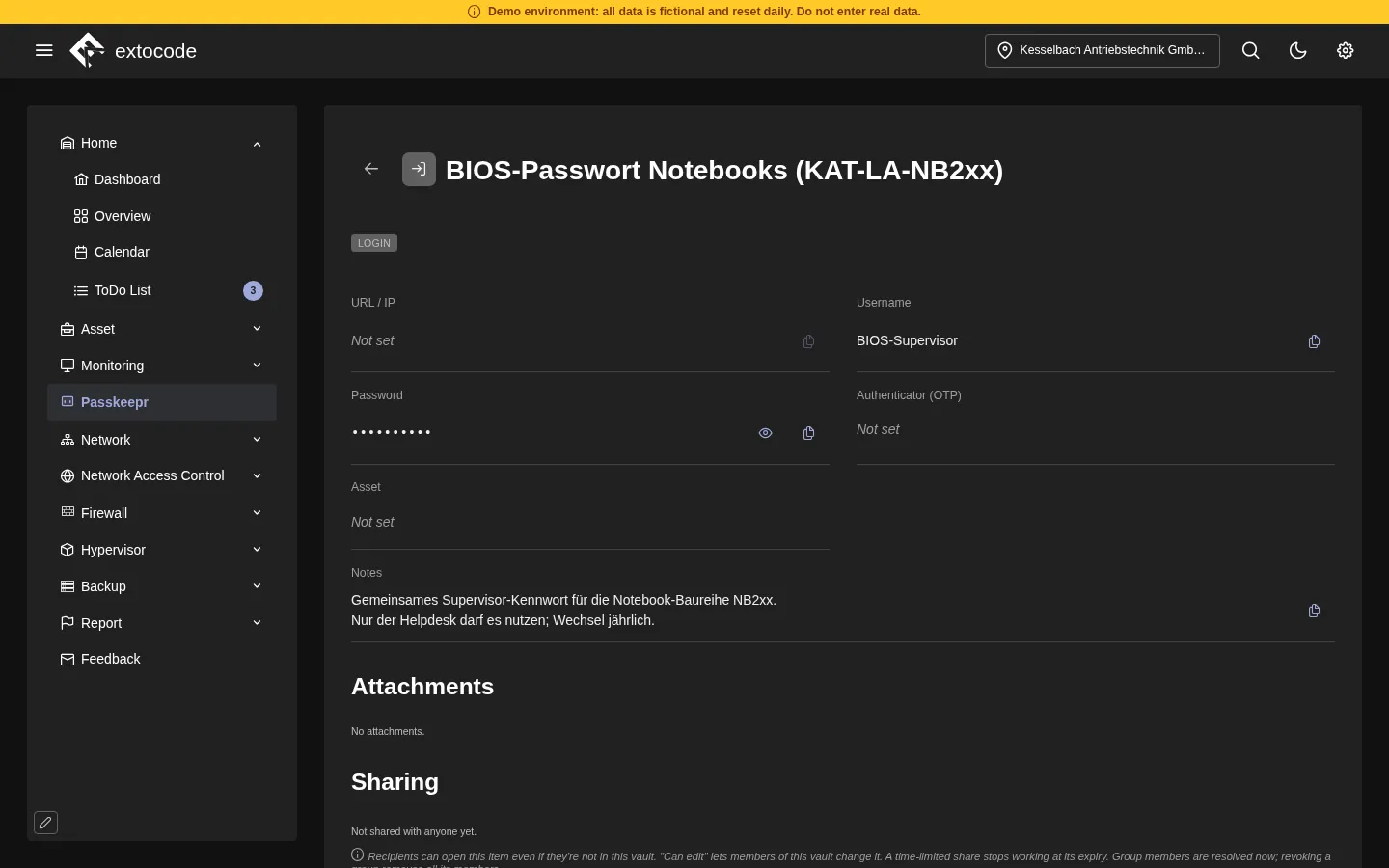
The demo runs COD 3.8 with the data of a fictional industrial company. In the open demo you see the menu entry and the unlock screen. Passkeepr cannot be set up there. The picture shows the vault of the demo with sample data. You can have it shown in a personal walkthrough.
- Demo: cod.demo.extocode.com, access details on extocode.com/demo
- Personal walkthrough: contact us
- Earlier post on Stronghold: COD 3.6: Stronghold and TACACS+
extocode GmbH · Central Operations Dashboard